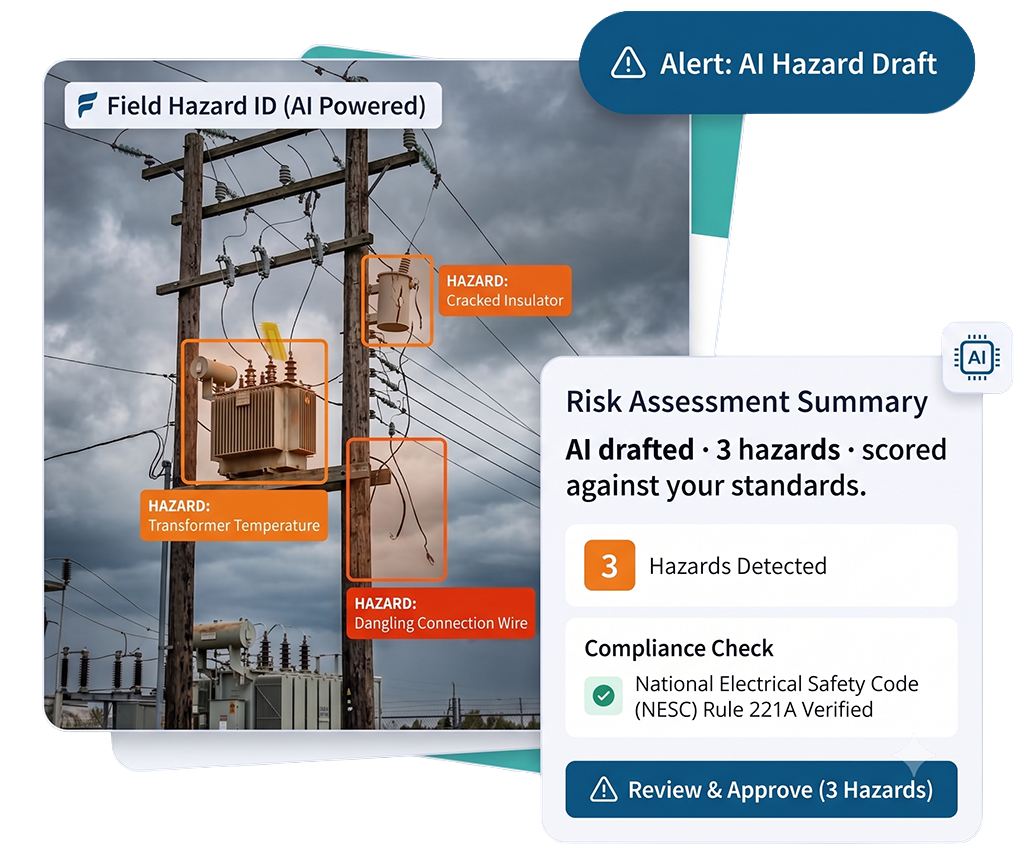
JSAs, inspections, near misses, tailboards, and permits — every field workflow on one platform, completed by voice and photo. The AI drafts the record and flags the hazard. Your team keeps the call, and the audit trail builds itself.
A safety management platform runs every field safety workflow — from JSAs and inspections to near-miss reporting and permits — in one system, and turns what the crew captures into leading indicators leaders can act on.
The difference is where the data comes from. Field1st captures it at the point of work by voice and photo, so records are complete and consistent before anyone reaches a desk, and the analytics on top of them can finally be trusted.
One platform replaces separate tools for job hazard analysis, near-miss and incident reporting, inspections, observations, and safety analytics. It is field safety software built for crews — and it gives EHS teams the leading indicators a back-office system was never designed to produce.
Talk through your workflows with someone who has rolled Field1st out across utility and heavy-industry crews.
Outcomes reported by Field1st customers. Dominion Energy partnership confirmed; additional customer names withheld pending approval.
WHY A PLATFORM, NOT POINT TOOLS
Six Things ThatOne Platform Changes.
01
Prevent Incidents Proactively
Hazards, near misses, and observations get caught at the point of work — before they become injuries.
02
Get Every Crew to Report
Voice and photo capture drive the frontline adoption that data quality — and every downstream metric — depends on.
03
Audit-Ready by Default
Every record is timestamped, signed, and OSHA-ready as it is created, so audit prep takes minutes, not weeks.
04
See Risk in Real Time
Leaders watch adoption, hazard trends, and near-miss rates as they happen — not in an end-of-month report.
05
Close the Loop
Every incident and near miss feeds back into JSAs, controls, and micro-training, so the next job is safer.
06
One Standard Everywhere
Consistent forms, terminology, and approvals across every crew, contractor, site, and region.
LESS ADMIN, MORE SAFETY
Every Field Workflow, Powered by AI,Controlled by Your Team.
The same pattern runs through every workflow: the crew captures, the AI drafts, and a qualified person makes the final call. Pick a workflow to see how.
01
Job Hazard Analysis (JSA / JHA)
Done before the work starts — not back-filled after.
CAPTURE
The crew describes the task by voice or photographs the job.
AI DRAFTS
HazardID fills the hazards and suggests controls from OSHA and your policy.
SIGN & SYNC
The supervisor reviews, signs on mobile, and it syncs — even offline.
02
Inspections & Observations
Findings captured on the walk — not typed up at a desk.
CAPTURE
Photos and voice notes recorded on the site walk.
AI DRAFTS
Findings and corrective actions are structured and assigned.
ROUTE
Actions route to the right person and track to closeout.
03
Near-Miss & Incident Reporting
Reported in seconds, at the point of work.
CAPTURE
The worker logs the close call by voice or photo on the spot.
AI DRAFTS
The report is structured, time- and geo-stamped, and classified.
PREVENT
It routes for same-day action and feeds the leading indicators.
04
Pre-Task Plans & Tailboards
A one-minute briefing crews will actually run.
CAPTURE
The crew talks through the plan; Voice1st records crew, hazards, controls.
AI DRAFTS
The plan is built and cross-checked for missing controls to confirm.
VISIBLE
Dispatch and supervisors see it in real time before work begins.
05
Permits & Closeout
Raised against the job, tracked through to done.
ISSUE
Permits and isolations are raised against the job and the crew.
TRACK
Approvals and corrective actions stay visible until they are closed.
PROVE
The full, signed history exports audit-ready in a click.
BUILT DIFFERENT
What You Won't Find inLegacy Safety Software.
A set of safety agents that come from designing for the crew and the asset first — not the compliance binder.
Snap a Photo. See the Hazard.
Add a photo to any form and HazardID identifies likely hazards in the image and highlights them for review — catching what a tired or rushed crew might miss, and scoring each finding against your own standards, not a generic checklist.
The Pre-Submit Gut Check
Before a JHA, tailboard, inspection, or observation is submitted, Field1st reviews the work and asks what obvious hazards or controls are missing — so gaps get caught at the tailgate, not in an incident report.
Answers That Know Where You're Standing
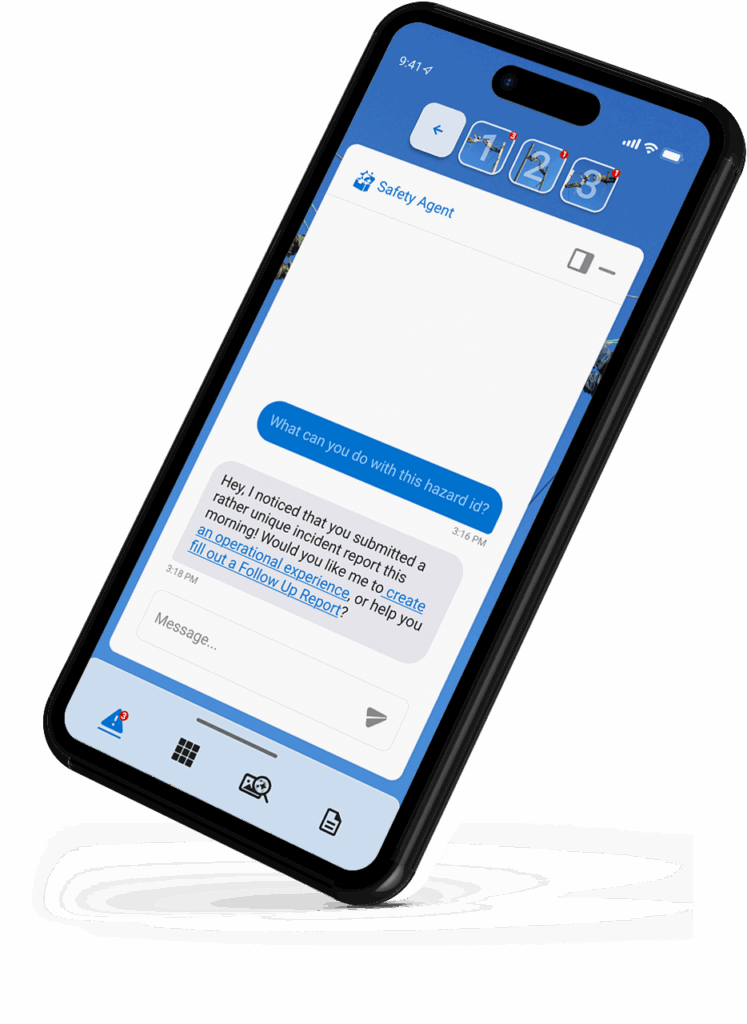
Ask in plain language and get guidance grounded in OSHA and your own policy, tied to the exact task, asset, and location — with the right form, control, or micro-learning attached.
Scan the Asset. the Right Form Opens.
Scan the barcode or QR on the truck, transformer, or panel and the correct form loads — pre-filled with the asset, location, and its history. No hunting for templates, no re-keying equipment numbers.
When the Job Changes, the Plan Changes Too
Scope shifts, weather turns, a new hazard appears. Field1st prompts the crew to rehuddle, re-confirm controls, and log the change — so the plan never goes stale at the tailgate.
See the Incident Before It Happens
Powered by Pulse1st, Field1st watches the leading indicators across every crew and flags the job, condition, or team trending toward an incident — so leaders act on the signal, not the aftermath.
No Bolt-Ons, No Integrations
Each agent works across every form and workflow out of the box — because they were built into the platform, not wired on afterward.
EVERY AGENT, ONE PLATFORM
Every Form Is AI-Readythe Moment You Build It.
Build a form once — no IT, no integration work — and it is instantly ready for voice, AI, and context. The same form a safety manager creates in minutes becomes a Voice1st workflow, an AI hazard analysis, and a job the Safety Agent understands.
Hands-Free From Day One
Any published form can be completed by voice with Voice1st. Spoken answers map into the right fields automatically, with no configuration.
Hazard Intelligence, Built In
HazardID, the Missing Hazard Checker, and photo analysis work across every form's fields — with no tagging, data mapping, or model setup.
The Agent Understands the Form
The Safety Agent recognizes the form type and content and tailors its guidance to the exact document the crew is completing.
This is the difference between AI bolted on and AI built in. Making a form smart usually takes engineering. In Field1st, every form is smart by default.
THE MOAT
Agents ThatSpeak Utility.
The sharpest wedge in field safety: agents built for the exact, high-risk hazards utility and T&D crews face every day — not generic construction checklists.
01
Never Skip a Step at the Tailboard
Walks the crew through the briefing step by step, prompting for the crew, the scope, the hazards, and the controls specific to this job — so the briefing is complete and consistent every time, on every crew.
02
Built for the Line
Flags the hazards specific to working around energized overhead lines — minimum approach distances, cover-up, grounding, and clearances — and confirms the controls are in place before the crew starts.
EVERYTHING IN THE PLATFORM
The FullField Safety Toolkit.
The building blocks behind every workflow — configurable by your team, without code.
01
Self-Service Form Builder
Build mobile safety forms yourself with conditional logic, reusable data sets, and API connections — no IT tickets. Every form is voice- and AI-ready the moment it's published.
02
Approvals & Corrective Actions
Route records to the right reviewer and track corrective actions to closeout, so nothing slips through.
03
Digital Signatures
Capture sign-off on the spot, even offline, with a signed, timestamped record.
04
Competency & Training Records
Store certifications and expiries so only qualified workers are cleared for the task.
05
Micro-Learnings
Deliver a short, task-specific lesson tied to the job or a recent incident — in the moment, without stopping the crew.
06
Smart Fields & Logic
Conditional logic, pre-filled data, and dropdowns make forms faster and reduce mistakes.
07
Audit-Ready Exports
Generate clean PDFs and registers for OSHA logs and external audits instantly.
08
Safety Analytics Dashboards
Real-time analytics on adoption, hazard trends, near-miss rates, and closeout across every crew and site.
09
Offline Mobile
Full capture and review in zero-signal environments, with secure sync when signal returns.
10
Ready1st Emergency Readiness
A lock-screen widget with your 911 address, GPS coordinates, and on-site crew — available even offline or if a worker can't communicate.
11
Content Library
Defenses and Operational Experiences surface the right hazard controls and real lessons learned, right inside the form.
12
Linked & Related Documents
Rehuddle to clone a brief for the next shift, or start a related document that pre-fills from the original — keeping records connected.
THE PART NO ONE ELSE BUILT
Roles, Groups & Hierarchy forMulti-Employer Worksites.
Real field organizations aren't flat. Field1st models your actual structure — crews, supervisors, groups, contractors, and clients — with permissions that match, so everyone sees exactly what pertains to their job and nothing that doesn't.
01
Access That Fits the Job
Users, Group Managers, Reporters, Form Architects, Content Editors, Client Reviewers, and Client Admins — each with exactly the access their role needs.
02
Per-Group, Not One-Size-Fits-All
Read and write control over documents, reporting, forms, data sets, and resources — set per group, so access maps to how your organization actually works.
03
See Only What Pertains to You
Compartmentalize data by group so each crew sees only the forms, templates, and documents that belong to their work.
04
Terminology per Group
Rename terms group by group — Rehuddle or Refocus, Brief Leader, Supervisor, Work Order — because adoption rises when the software speaks the crew's language.
05
Sign-Offs Up the Chain
Assign supervisors, route approvals and notifications up the hierarchy, and control exactly who can edit or approve each document.
06
Bring Subs in, No Seats Required
Onboard subcontractors with QR and magic-link guest profiles and a company code, with full visibility into who accessed and completed what.
ENTERPRISE READY
Central Oversight. Local Execution.Full Control of the AI.
Built for the governance utility, energy, and heavy-industry buyers require — without the change-management weight of a legacy suite.
01
AI Guardrails
Control where AI drafts and where a person must review and sign off. The call always stays with your team.
02
Full Audit Trail
Every JSA, permit, and incident is timestamped, signed, and traceable back to the job.
03
Central Oversight
Head office sees real-time compliance across every site while crews capture their way.
04
Audit-Ready OSHA Logs
Track TRIR, DART, and LTIFR with OSHA-standard formulas and historical trends, generated from data crews already capture.
05
Offline by Design
Full inspection, form, and corrective-action workflows run without a signal and sync later.
06
Scales Without Admin
Start with one site or roll out across hundreds — without adding overhead or IT projects.
BUILT FOR YOUR INDUSTRY
One Platform,Every High-Risk Vertical.
Field1st is built for the multi-employer, distributed worksites where safety is hardest — and where most software gets skipped.
Utility Safety Software
Voice tailboards, OSHA job briefings, storm-restoration workflows, and real-time crew visibility for T&D and electric utility crews.
Oil & Gas Safety Software
Contractor crew management, permits and isolation checks, and PSM and API RP 754-aligned incident reporting.
Construction Safety Software
Pre-task planning, JSAs, inspections, and near-miss capture that subcontractors and field crews will actually complete.
Contractor & Industrial
Contractor safety management and industrial maintenance, with one verified source of truth across crews, subs, and clients.
REAL-TIME SAFETY PULSE
Pulse1st Turns Field CaptureInto Foresight.
Every voice note, photo, and near miss becomes a live signal. Pulse1st reads the heartbeat of your safety program — so leaders see what's working, what's slipping, and what's coming next.
01
The Field, Live
A live read on adoption, hazard trends, near-miss velocity, and crew engagement — updated as the field reports, not at month-end.
02
Yesterday's Lessons, Today
Automated daily, weekly, and monthly summaries reach leaders' hands — so every day starts informed, with no manual reporting.
02
Yesterday's Lessons, Today
Automated daily, weekly, and monthly summaries reach leaders' hands — so every day starts informed, with no manual reporting.
03
Predict, Don't Count
Adoption, participation, hazard-to-control ratios, and closeout rates roll into a score that anticipates risk instead of tallying incidents.
04
Coach the Outliers
See adoption and risk crew-by-crew and site-by-site, so you reach the teams that need help before an incident finds them.
05
The Next Right Action
Surfaces hidden trends and root causes, then recommends the move: a targeted rehuddle, a micro-learning, or a control update.
06
One Click to the C-Suite
Compliance status, OSHA logs, and program KPIs export audit-ready and boardroom-ready, with no spreadsheet wrangling.
INTEGRATIONS & DATA
Your Safety DataShouldn't Live in a Silo.
Field1st can replace a stack of disconnected tools — or sit in front of the systems you already run — so you fix field adoption without ripping out the back office.
01
Feed Your Existing EHS
Push clean, voice-captured field data into your current EHS or ERP so leadership keeps its system of record — and finally gets trustworthy field inputs.
02
Connect Anything
Pull safety data into your own dashboards, BI, and compliance tools with full programmatic access.
03
Replace the Stack
Or consolidate JSAs, permits, inspections, and incidents into one platform and retire the paper, spreadsheets, and point tools.
SECURITY & DATA PROTECTION
Enterprise-Grade Security.Your Data Stays Yours.
Built for the security and data-protection standards utility and energy buyers require: encryption in transit and at rest, role-based access, full audit trails, and offline-first handling.
Field1st reached 100% supervisor adoption at Dominion Energy, built in partnership with their safety organization.
MAJOR T&D UTILITY
Supervisors and crew leads adopted daily capture in six months, with JSAs completed 60% faster and 3× more near misses reported.
CONSTRUCTION
Low-friction voice capture drove a real shift from reactive reporting to catching near misses before they became incidents.
Outcomes reported by Field1st customers. Dominion Energy partnership confirmed; additional customer names withheld pending approval.
WHERE FIELD SAFETY IS GOING
We're Building the Safety SystemThat Sees Around Corners.
Field1st is disrupting an industry that digitized paper and called it progress. This is the direction we're building toward.
01
ON THE ROADMAP
Real-Time Audio Coaching
The agent listens as a crew builds a plan and speaks up in the moment: “You mentioned trenching but not shoring. Confirm the controls are in place.”
02
ON THE ROADMAP
Every Language on the Crew
Voice1st capturing and translating Spanish and more in the field into structured English for the office — so no worker is left outside the safety net.
03
ON THE ROADMAP
A Connected Jobsite
Barcodes today, sensors and wearables next — pulling equipment, environmental, and biometric signals into one risk picture.
04
ON THE ROADMAP
Self-Improving Programs
As patterns emerge, Field1st drafts the control, the micro-learning, and the form update — so your safety program gets smarter on its own.
PLATFORM QUESTIONS
Frequently AskedQuestions.
What Is a Safety Management Platform?
A safety management platform runs every field safety workflow, from JSAs and inspections to near-miss reporting and permits, in one system, and turns the captured data into leading indicators. Field1st is built for the frontline, so crews complete it by voice and photo.
What Workflows Does the Field1st Platform Cover?
JSAs and job hazard analyses, inspections and observations, near-miss and incident reporting, pre-task plans and tailboards, permits, corrective actions and closeout, plus dashboards and reporting.
Can We Keep Using Our Own Forms?
Yes. A self-service form builder lets you bring your existing JSAs, tailboards, and inspection forms and configure any workflow by site or contractor, without IT.
Does Field1st Integrate With Our Existing EHS or ERP System?
Yes. Field1st can sit in front of your existing EHS or ERP and feed clean, voice-captured field data into it via API, so you improve field adoption without ripping out the back office.
How Is the AI Controlled, and Does It Replace Safety Judgment?
No. The AI drafts records and flags hazards, but a qualified person reviews and signs off. Admins control where the AI is allowed to draft and where human approval is required.
Does the Platform Work Offline?
Yes. Crews capture hazards, forms, and corrective actions in zero-signal environments, and everything syncs when signal returns.
How Long Does It Take to Set Up?
Most teams run their first workflow in days, not months. You start with one site or one workflow and expand from there.
How Is Field1st Priced?
Usage-based with no per-seat minimums, so every crew member, contractor, and seasonal worker is covered without a per-user safety tax.
Is Field1st EHS Software or Field Safety Software?
Both, from the field's side. Field1st is field safety software that captures better data at the point of work, and it delivers the EHS reporting and leading indicators an enterprise EHS system needs, without the back-office friction.
Does Field1st Include JSA, JHA, and Near-Miss Reporting Software?
Yes. Field1st is job hazard analysis (JSA and JHA) software, near-miss and incident reporting software, safety inspection and observation software, and safety analytics, in one platform, all completed by voice and photo.
Field1st vs. Legacy EHS
Still Running Safety on a Legacy EHS System?
See a side-by-side breakdown of Field1st against the platforms field teams are leaving behind — features, usability, and total cost, laid out in plain view.
One Platform Your Crews Useand Your Leaders Trust.
Book a Walkthrough Built Around Your Workflows.
See how field capture becomes prevention. 20 minutes, built around your crews, no prep needed. The AI-first safety platform built for the jobsite, not the back office — predict and prevent incidents across every project and crew.